
Authentication
Every API request to the Privacy Portal Admin API must be authenticated. To authorize external scripts, developer portals, or orchestration tools, you must generate a secure API key and include it in your HTTP headers.
In this tutorial, you will learn how to obtain your API key via the BigID product integration and construct the necessary authentication headers.
1. Locating the Privacy Portal Integration
Section titled “1. Locating the Privacy Portal Integration”When the Privacy Portal is integrated into BigID, it is accessed as a custom application.
-
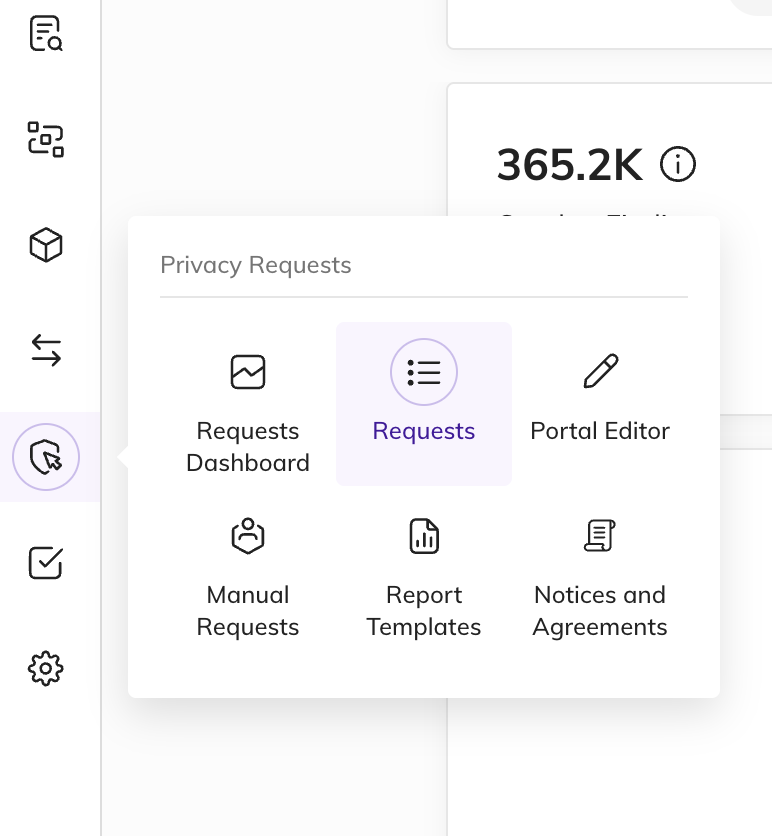
Find the Requests Menu
By default, the Privacy Portal is accessed via the BigID integration at the following URL pattern:
https://<YOUR_BIGID_URL>/#/customApp/69a802316d9bfbd8e1fzzb0/request-managerThe left-hand sidebar displays the main navigation menu with the Requests item selected:
-
Transition to the Users Settings Page
API Key settings are located in the User Settings panel. Replace
/request-managerat the end of the URL with/settings/usersto jump directly to this screen:https://<YOUR_BIGID_URL>/#/customApp/69a802316d9bfbd8e1fzzb0/settings/users
2. Generating Your API Key
Section titled “2. Generating Your API Key”-
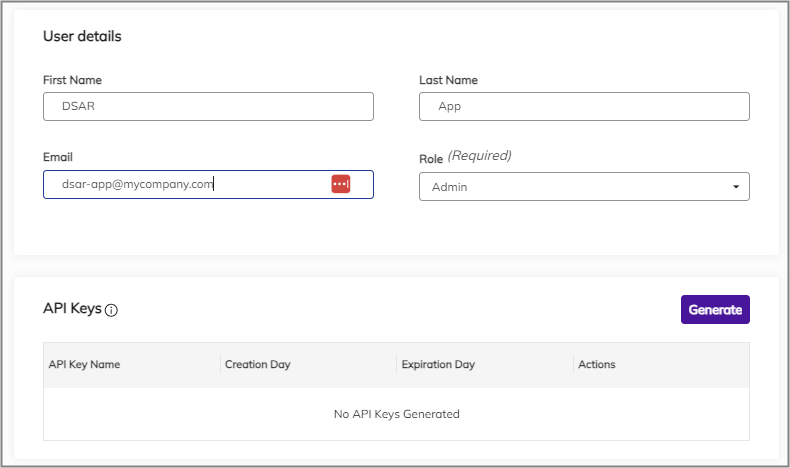
Select Your User Profile
On the Users Settings screen, select the user account for which you want to generate an API key. Scroll to the bottom of their profile to find the API Keys section.
-
Launch the Generation Modal
Click the Generate button in the top-right corner of the API Keys grid.
-
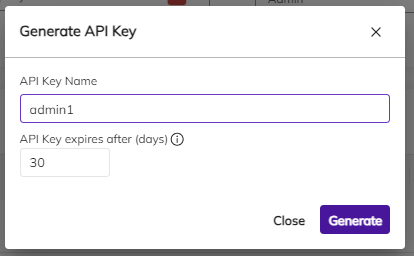
Configure Expiration and Name
In the configuration dialog:
- API Key Name: Enter a descriptive name (e.g.,
Orchestration-Automation-Key). - API Key expires after (days): Set the expiration duration. The maximum limit is
3650days (10 years).
Click Generate to proceed.
- API Key Name: Enter a descriptive name (e.g.,
-
Copy the Key Value Immediately
The next dialog displays your newly generated token value.
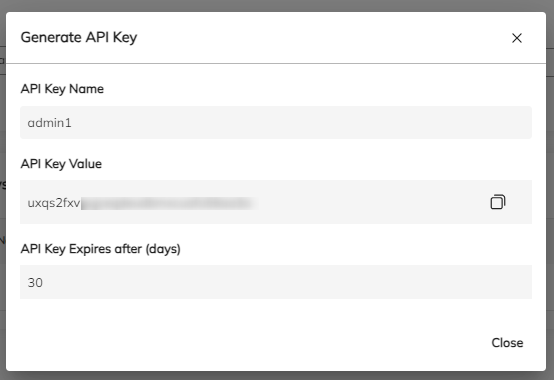
Click the copy icon (clipboard) to copy the key immediately.
3. Authenticating Requests
Section titled “3. Authenticating Requests”To authenticate requests to the Admin API, pass your copied key in the X-API-Key HTTP header.
Request Headers
Section titled “Request Headers”X-API-Key: YOUR_GENERATED_API_KEYContent-Type: application/jsonCode Examples
Section titled “Code Examples”Select your preferred language to see how to authenticate your API calls:
import requests
url = "https://bigidprivacy.cloud/api/prm/my-tenant/user-profiles"headers = {    "X-API-Key": "YOUR_API_KEY",    "Content-Type": "application/json"}
response = requests.get(url, headers=headers)print(response.json())
const url = 'https://bigidprivacy.cloud/api/prm/my-tenant/user-profiles';const headers = { 'X-API-Key': 'YOUR_API_KEY', 'Content-Type': 'application/json'};
async function getUserProfiles() { try { const response = await fetch(url, { headers }); const data = await response.json(); console.log(data); } catch (error) { console.error('Error fetching user profiles:', error); }}
getUserProfiles();All rights reserved.